Getting started
You connect your GoHighLevel sub-account here once. We give you a private link. You paste that link into Claude or ChatGPT. Now it can work inside that sub-account — create contacts, move deals, send messages, build invoices, pull reports — with 272 tools. No code, no software to install.
One link per sub-account. Each link only works for the sub-account you connected it to, so a link for Client A can never touch Client B's data.
Step 1 — Create your Private Integration token (3 minutes)
Do this inside the sub-account you want to connect.
- Go to Settings → Private Integrations
- Click Create New Integration
- Name it anything (e.g. "Claude MCP")
- Tick the scopes — this decides what Claude or ChatGPT will be allowed to do. Easiest approach: tick everything you're comfortable with. Missing a scope isn't dangerous; the tool that needs it will just return an error naming the missing scope, and you can add it later.
- Click Create, then copy the token (it starts with
pit-). You only get to see it once — copy it now.
Recommended scope set
contacts (read + write) · conversations +
conversations/message (read + write) · opportunities
(read + write) · calendars + calendars/events
(read + write) · workflows (read) · campaigns
(read) · forms (read) · surveys (read) ·
funnels (funnel/page/redirect) · links (read + write)
· locations/customFields, locations/customValues,
locations/tags, locations/tasks (read + write) ·
medias (read + write) · products +
products/prices + products/collection (read + write) ·
payments/orders, payments/transactions,
payments/subscriptions, payments/coupons ·
invoices + invoices/schedule + invoices/template +
invoices/estimate (read + write) · objects +
associations (read + write) · users (read + write) ·
businesses (read + write) · store (read + write) ·
emails (read + write) · courses (write)
Step 2 — Get your Location ID (30 seconds)
- In the same sub-account, open Settings (left sidebar, near the bottom)
- Click Business Profile — it is the first item under Settings
- Look at the top right of the General Information panel. The Location ID sits there on its own, with a copy button next to it.
It is a 20-character jumble of letters and numbers, something like
ve9EPM428h8vShlRW1KT. Not your business name, and not your email.
If you would rather not go hunting: it is also sitting in your browser's address bar
right now, between /location/ and the next slash —
app.gohighlevel.com/v2/location/ve9EPM428h8vShlRW1KT/dashboard
Step 3 — Add the sub-account here (1 minute)
- Log in to your dashboard
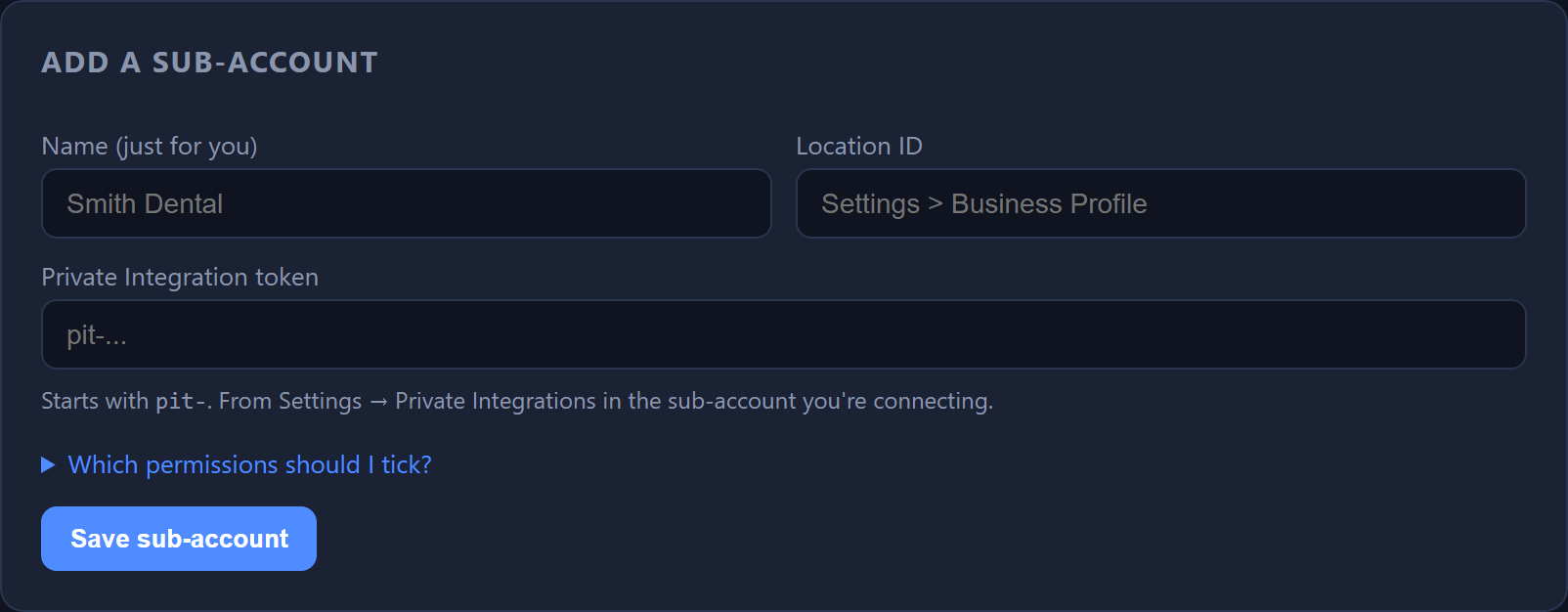
- Click Add sub-account
- Fill in: a name (just for you — e.g. "Smith Dental"), the
Location ID, and the
pit-token - Click Save, then click Test
A green live pill means it works. If you see an error, it will tell you exactly what's wrong (usually a missing scope — go back to Step 1 and tick it).
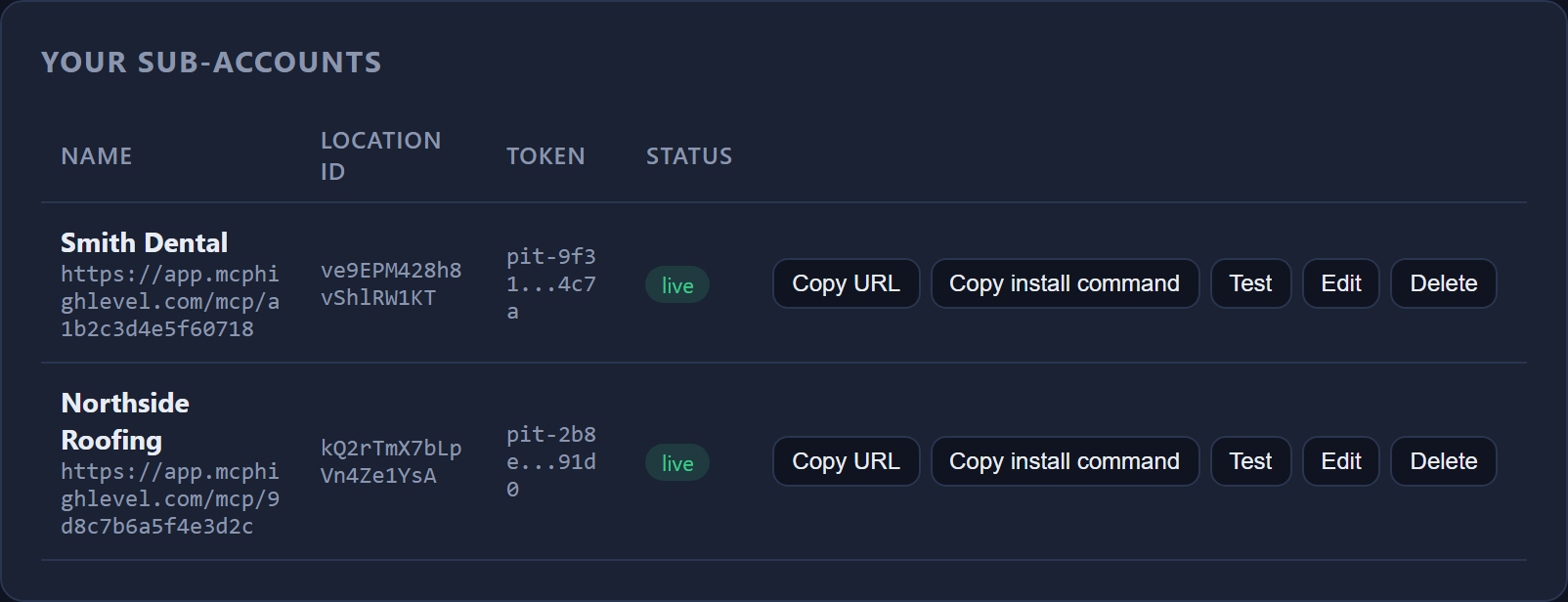
pit-9f31…4c7a; it is never displayed in full again.Your first sub-account is free forever, on the 117 read-only tools — Claude or ChatGPT can look at everything but not change it. To let it create, send and update, or to add a second client, upgrade for $12/month; PayPal will ask you to approve the amount and the sub-account goes live the moment you do.
Step 4 — Connect it to Claude or ChatGPT (1 minute)
Click Copy install command or Copy URL on your sub-account row, then:
For Claude Code (desktop or terminal)
Paste the copied command into a terminal:
claude mcp add -s user --transport http smith-dental "https://app.mcphighlevel.com/mcp/smith-dental-a1b2c3d4e5f60718"
Then start a new Claude session. (Tools only load in sessions started after you add a connector.)
For claude.ai (web or mobile) or Cowork
Settings → Connectors → Add custom connector → paste the copied URL. No token, no headers — the link is the credential.
For ChatGPT
- Open Settings and click Plugins
- Select MCPs, then Add MCP server
- Set the type to Streamable HTTP
- Paste the copied URL and save. No token, no headers — the link is the credential, exactly as with Claude.
All 272 tools load, and the same free/paid rules apply.
Don't see Plugins or MCPs in your settings? MCP servers need a paid ChatGPT plan, and on team workspaces an admin has to allow them. OpenAI moves this around from time to time; their connectors help article has the current rules.
Step 5 — Try it
Start a new chat and ask:
- "Using smith-dental, list my workflows."
- "Using smith-dental, show me open opportunities over $1,000."
- "Using smith-dental, create a contact named Jane Doe with email jane@example.com and tag her 'website-lead'."
Frequently asked questions
Do I need to know how to code?
No. You copy two values from GoHighLevel and paste one link into Claude or ChatGPT.
Is my token safe?
Your token is encrypted before it is stored, and it is never shown again — not even
to you (you'll only see something like pit-f855...4182). It never leaves our
server: Claude or ChatGPT only ever sees your private link, never the token.
Treat your private link like a password
Anyone who has it can use that sub-account's tools. If it ever leaks, delete the sub-account here and re-add it — that instantly kills the old link and gives you a new one.
Can one link touch my other clients' sub-accounts?
No. Every link is locked to the one sub-account you connected it to. The tools don't even accept a location as an input.
Can Claude or ChatGPT delete my contacts?
No. We deliberately do not include destructive tools like delete-contact. Claude or ChatGPT can create, update, tag, and message — not wipe your database.
GoHighLevel has its own free MCP — why use this?
Theirs is great for one sub-account at a time and we'd genuinely recommend it if that's all you need. Ours is built for people running many sub-accounts: one dashboard, one click per client, direct single-call tools (faster and cheaper for automations), and safety guardrails for anything running unattended.
What does it cost?
Your first sub-account is free forever on the read-only tools. All 272 tools are $12/month per sub-account, or $99/month for unlimited on the Agency plan. No contract, cancel anytime.
What happens if I cancel?
Your links stop working. Your data stays with GoHighLevel — we never store your contacts, only the connection details.
Which AI apps work?
Claude Code, claude.ai (web/mobile), Cowork, and ChatGPT (paid plans). Under the hood this is a standard MCP server over Streamable HTTP, so any MCP client that supports that transport will work — Cursor, VS Code and the rest included.
Still stuck?
Open a support ticket from your dashboard — a human answers, within 24 hours, and you track the whole conversation in your account.